Skiaform / Guides
Architecture portfolio layout: a practical guide
Build an architecture portfolio layout with a 12-column grid, clear page sequences, and practical rules for applications and interviews.
A clear architecture portfolio layout starts with choosing what deserves a page. If you're applying for an internship or your first job, you probably have more studio work than you can use and less time than you'd like. This guide gives you a structure you can build in InDesign: a short application PDF and a longer portfolio, both using the same grid. You'll know which pages to make, what belongs on them, and when to stop adding work.
How long should an architecture portfolio be?
Keep two versions: a 3 to 5 page work sample for applications and emails, and a 10 to 14 page core portfolio for interviews and longer reviews. Start with your best work. A project earns its place because you can explain the design and support it with useful images and drawings.
You don't need to include every studio semester. Put additional material in optional extra pages and use those when someone asks, including for a graduate school application. Follow any specific submission requirements you receive.
Build both versions from one system. Your work sample should be the core portfolio with pages removed. Use the same page size, type styles, and project information so a deadline doesn't leave you maintaining two separate designs.
If you're figuring out how to make an architecture portfolio from a folder full of exports, choose two or three projects first. Lay out the strongest one before committing every project to a page count.
The architecture portfolio layout grid
Set up US Letter or A4 in landscape orientation, with 0.5 in (12.7 mm) margins. Use 12 columns with a 0.1875 in (about 4.8 mm) gutter. Landscape suits screen viewing and gives wide drawings room across the page.
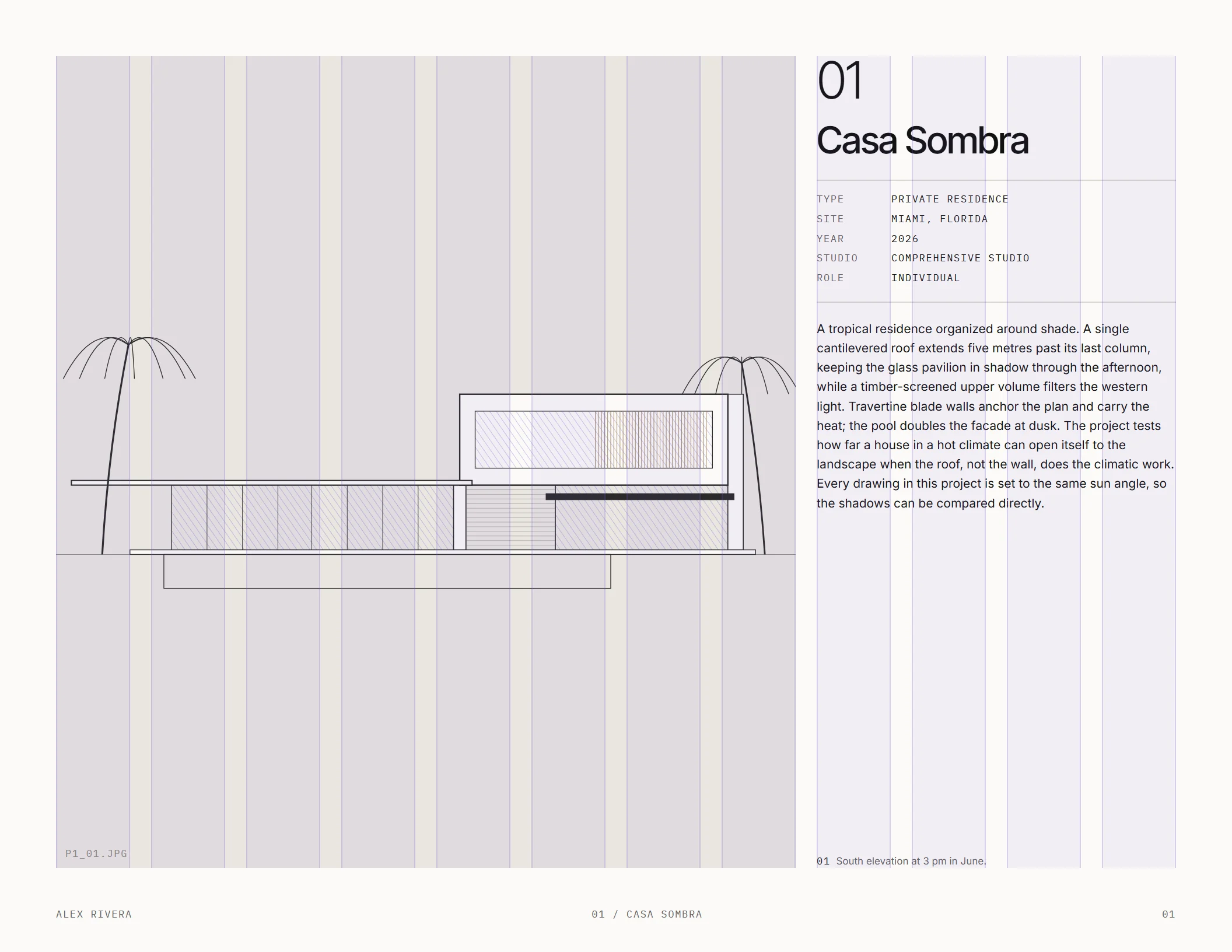
The benefit of 12 columns is practical: they divide into halves, thirds, and quarters. Two images can each occupy six columns. Three can each occupy four. A text column can sit beside an image without requiring a new alignment rule on every page.
In InDesign, establish the margins and column guides before placing your work. Treat them as shared reference points. An image can cross several columns; it doesn't need to fit inside one narrow strip.
Keep the outer margins clear enough that captions, page numbers, and drawings have a consistent edge. When a page feels crowded, reduce what you're asking it to contain. Shrinking every element usually leaves the original problem in place.
The page sequence
Plan the sequence before polishing individual pages. A row of rough page thumbnails is enough to see whether one project is taking over or whether your strongest drawing is buried.
For a five-page work sample, use:
- Cover.
- Project one, on one page.
- Project two, on one page.
- Project three, on one page.
- Contact.
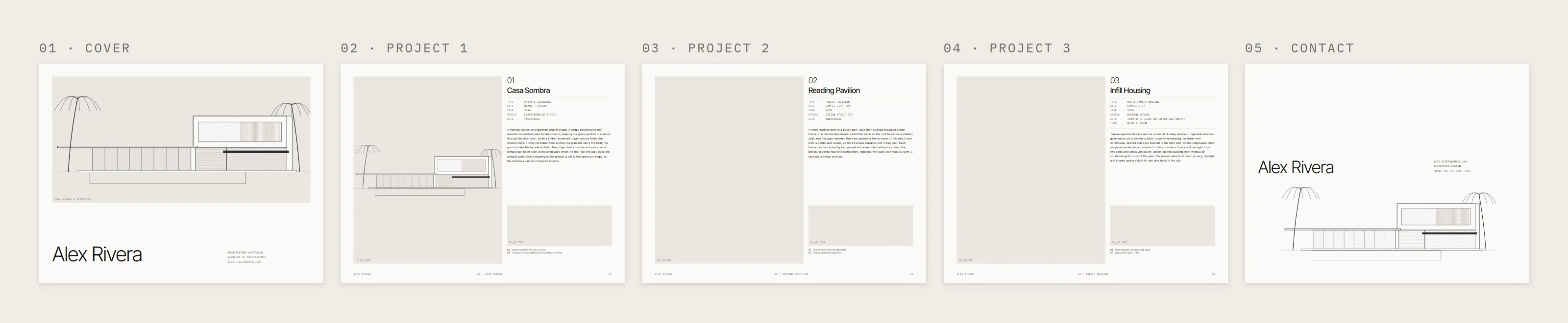
With two projects, this becomes four pages. Each project page pairs a hero image with the facts table, a shorter description and one supporting image, which is enough to understand the work and your role. Leave the fuller explanation for the core portfolio.
For a ten-page core portfolio with three projects, use:
- Cover.
- About and resume.
- Project one opener.
- Project one image body page.
- Project one drawings page.
- Project two opener.
- Project two body page.
- Project three opener.
- Project three body page.
- Contact.
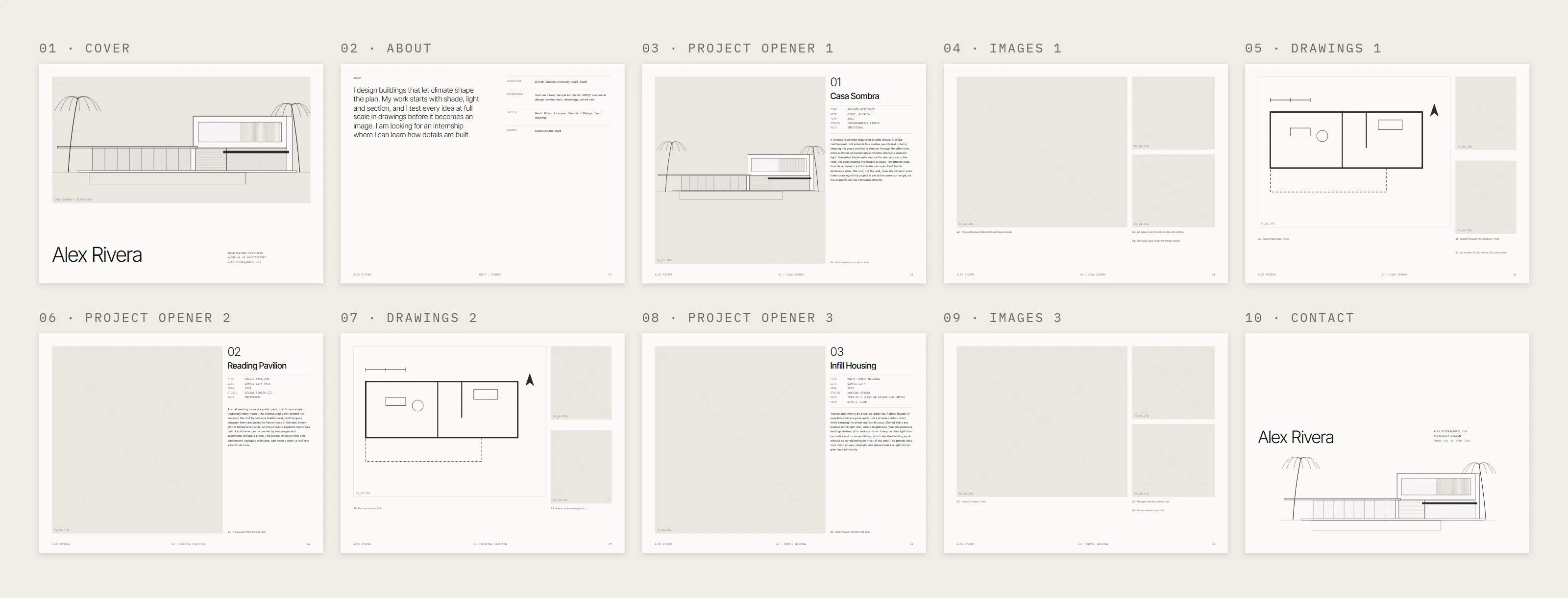
The first project gets the extra drawings page. Choose work that can sustain that closer look, with drawings that explain how the proposal works.
Use the remaining pages up to fourteen only where a project needs them. A short architecture student portfolio can still show a complete line of thought. You can explain an idea, show its spatial result, and provide drawings without giving every project an identical number of pages.
Page by page
Cover
Use one strong image or drawing, your name in large type, and your contact details in small type. Give the image enough space to read without competing with a long title.
An architecture portfolio cover page should introduce both you and the work. Spending the whole page on the word “Portfolio” uses space that could carry an actual design decision. Check that your name and contact details remain easy to find when the PDF is viewed at page size.
About and resume
Write a 35 to 50 word statement in your own voice. Say what interests you in architecture and what you want to work on. Keep it specific enough that it sounds like you.
Pair that statement with four short resume blocks: education, experience, skills, and awards. Use a clear hierarchy so someone can move between the blocks quickly. If a block is thin, keep it short. You don't need to fill the page with prose to make the experience look substantial.
Project opener
Place the hero image across eight of the twelve columns. Use the remaining four for the project number, title, facts table, and an 80 to 120 word description.
The facts table should include type, site, year, studio, role, and team. Keep the entries compact. This is where a reader should be able to establish the project's context without searching through the description.
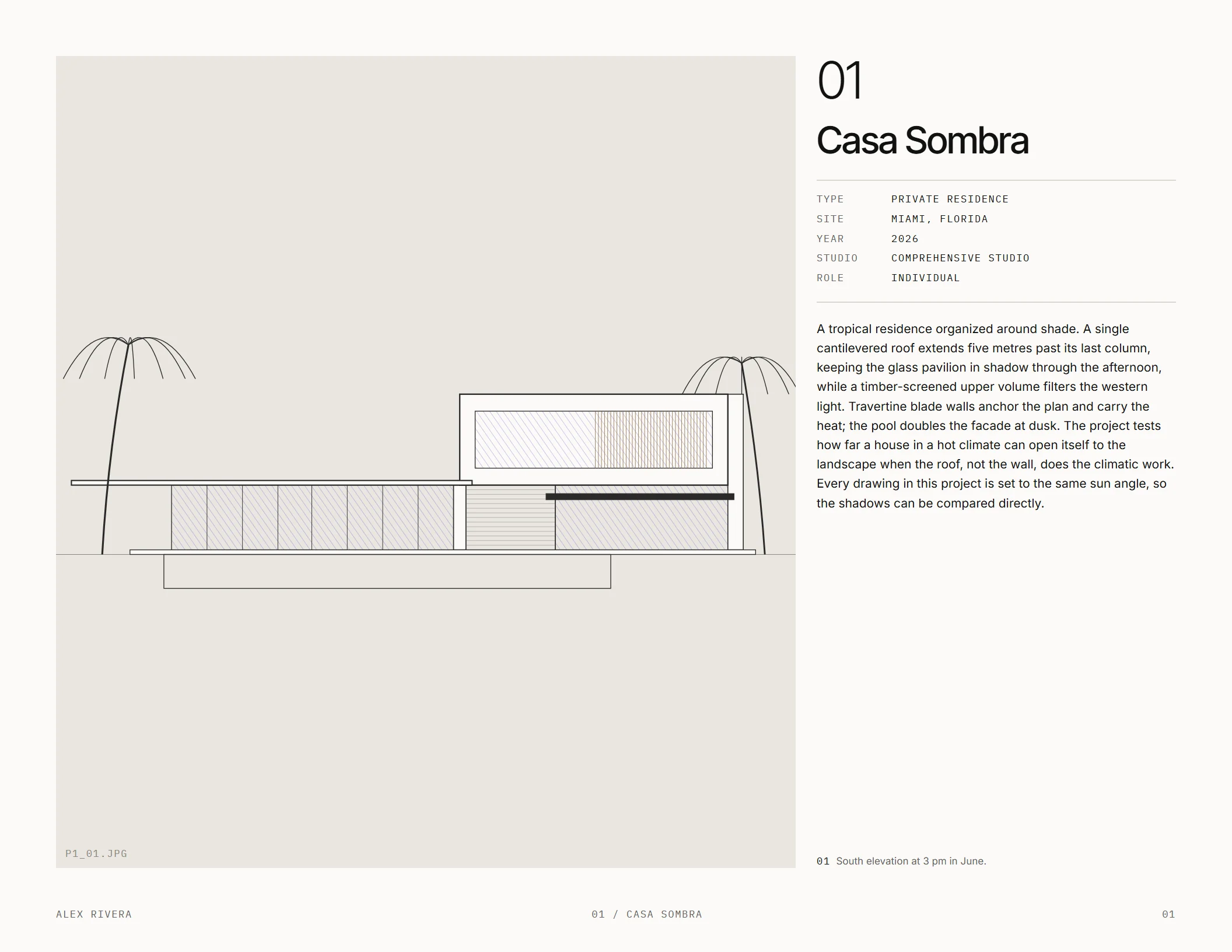
Choose the hero image for what it explains. A view that makes the main spatial idea clear gives the text something concrete to discuss. Keep the same information order across your openers so readers can find the details as they move between projects.
Body page: images
Use one large image across eight columns, with two smaller images in the remaining four. Give the large image the main job of the page. The smaller images can explain another space or a detail that needs a closer view.
Number the captions and keep each to 15 words or fewer. Make their relationship to the images obvious. If two views tell the same story, remove one and give the other more space.
Body page: drawings
Give a large drawing nine columns, then use the remaining space for two details. Choose details that help explain something visible in the main drawing.
Every drawing needs a stated scale. Write it in the caption, such as “Ground floor plan, 1:200.” If you resize a drawing during layout, check that its stated scale still matches the final output.
Look at the whole page at its intended size. A drawing that only reads when you zoom far into the PDF needs more room or a simpler selection of information.
Optional pages and contact
Process pages can include sketches and models when they explain how a design developed. “Selected other work” can hold material that deserves a place outside the main project sequence. Add either only when it contributes something you haven't already shown.
Finish with a contact page that makes your name and contact details easy to find. Keep it within the same visual system as the cover and project pages.
Writing that fits the layout
Write each project description in 80 to 120 words. Start with the idea, explain how the building achieves it, then say what the project tests. Draft this before fine-tuning the text frame so you know how much space the writing actually needs.
Replace broad claims with decisions visible in the work. If a paragraph discusses a courtyard, put it beside an image or drawing where the courtyard can be understood.
Keep titles to 40 characters or fewer. Captions get one idea each and no more than 15 words. For drawings, include the drawing name and scale within that limit.
Credit teammates and state what you did. “Team project” leaves your contribution unclear; name your role in the facts table and identify your work in the relevant captions where needed. Work completed at a firm needs the firm's permission before you include it.
If a description won't fit, edit the description before you reduce the type size.
Typography for architecture portfolios
Choose one dependable type approach and repeat it throughout the document. These options use free, open-licensed fonts:
- A neutral Swiss grotesk, such as Inter, for a consistent typographic voice.
- An editorial serif for titles with a sans for text, such as Instrument Serif and Instrument Sans.
- A wide architectural grotesk in caps for titles, such as Archivo in an expanded width.
Use a monospace such as IBM Plex Mono for small labels and metadata. Keep it assigned to those jobs so it helps distinguish information.
Start body text around 9 to 10 pt. Check it at actual page size alongside captions and facts tables. Create paragraph styles in InDesign for the recurring elements. When you adjust spacing or type size, change the paragraph style so every page updates at once.
Exporting and sending
Export an email PDF under 10 MB for applications. Open the exported file and check every page, including the cover, contact details, captions, and drawings. Judge the file you'll send, since layout decisions can look different once you're viewing the complete PDF.
For print, export a PDF at 300 ppi with bleed. Check the drawing scales against the intended printed page size.
Use a clear filename: Firstname-Lastname-Portfolio-2026.pdf. Before attaching it, confirm that you've selected the intended version and met the application's submission requirements. Keep the work sample and core portfolio easy to distinguish in your own folders.
FAQ
How many projects should be in an architecture portfolio?
Two or three strong projects can form your first work sample. The ten-page core sequence above uses three, with more room for the first. Choose projects you can explain clearly and identify your contribution to each.
Portrait or landscape?
Use landscape for this system. It suits screens and wide drawings, and the 12-column grid accommodates several image arrangements. Keep the same orientation across the work sample and core portfolio.
What goes on an architecture portfolio cover page?
One strong image or drawing, your name in large type, and small contact details. Use the page to introduce your work while making it clear whose portfolio the reader has opened.
Should I use AI for my portfolio?
AI can help you choose projects and tighten text, and it can draw, style or render a model you built yourself. Keep the descriptions accurate and in your voice. It should never add to or change your design, or generate work you present as your own.
Skiaform's portfolio template, coming soon, is built on this exact system. You can get the free portfolio checklist while you assemble your pages.
Get the free portfolio checklist
A two-page checklist of everything in this guide. It downloads as soon as you sign up. No spam.