Skiaform / Guides
Architecture portfolio website: build and host one free
Plan, build and host a free architecture portfolio website: page structure, image sizes, optional AI agent prompts and Cloudflare Pages setup.
An architecture portfolio website gives someone a link to your work before you meet. This guide is for students and recent graduates with a PDF portfolio and no web experience. You'll build a small site with 3 to 4 projects at a free yourname.pages.dev address, with your own domain optional. AI is optional too.
What an architecture portfolio website is for
Send your PDF work sample with every application, following its requirements. Many applications ask for a file, and reviewers read offline. Put the site link in your email signature, LinkedIn and resume header.
A site gives large images room to fill the screen, lets reviewers zoom into drawings, and opens on a phone without a download. One address always shows your current work.
Keep your online architecture portfolio to the same 3 to 4 projects as the PDF. Reuse the 80 to 120 word descriptions and captions up to 15 words so you write once. Add one link labeled Download PDF portfolio, pointing to Firstname-Lastname-Portfolio-2026.pdf.
What to put on it and what to leave off
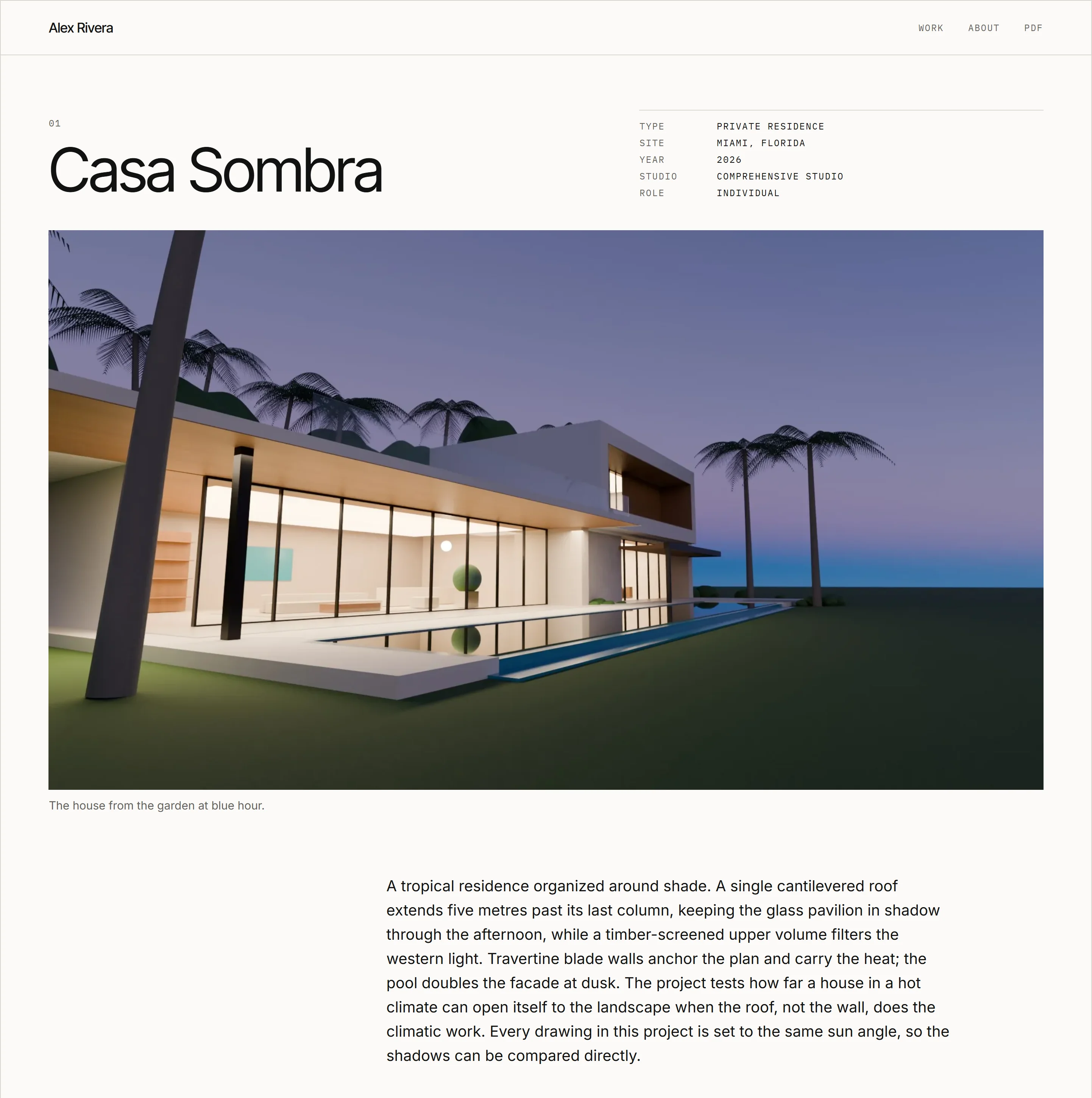
Include your name, a 35 to 50 word statement, and 3 to 4 projects. Each project needs a hero image; type, location (city and region), year, studio or course, your role and team credit; an 80 to 120 word description; and 4 to 8 captioned images and drawings.
Add a short resume covering education, experience, skills and awards, an email address, the PDF link and LinkedIn if you have it. Extra work can go on one optional selected other work page.
Leave off weak or unfinished projects, every iteration, and assignments without design work. Skip software skill bars or percentages, an unattended blog, home-page carousels, background music, splash animations and under construction pages. Keep your phone number and home address private.
Page structure
Use four page types:
- Home: an index of projects.
- Project: one page per project.
- About: statement, resume and PDF link.
- Contact: its own page or a section on About.
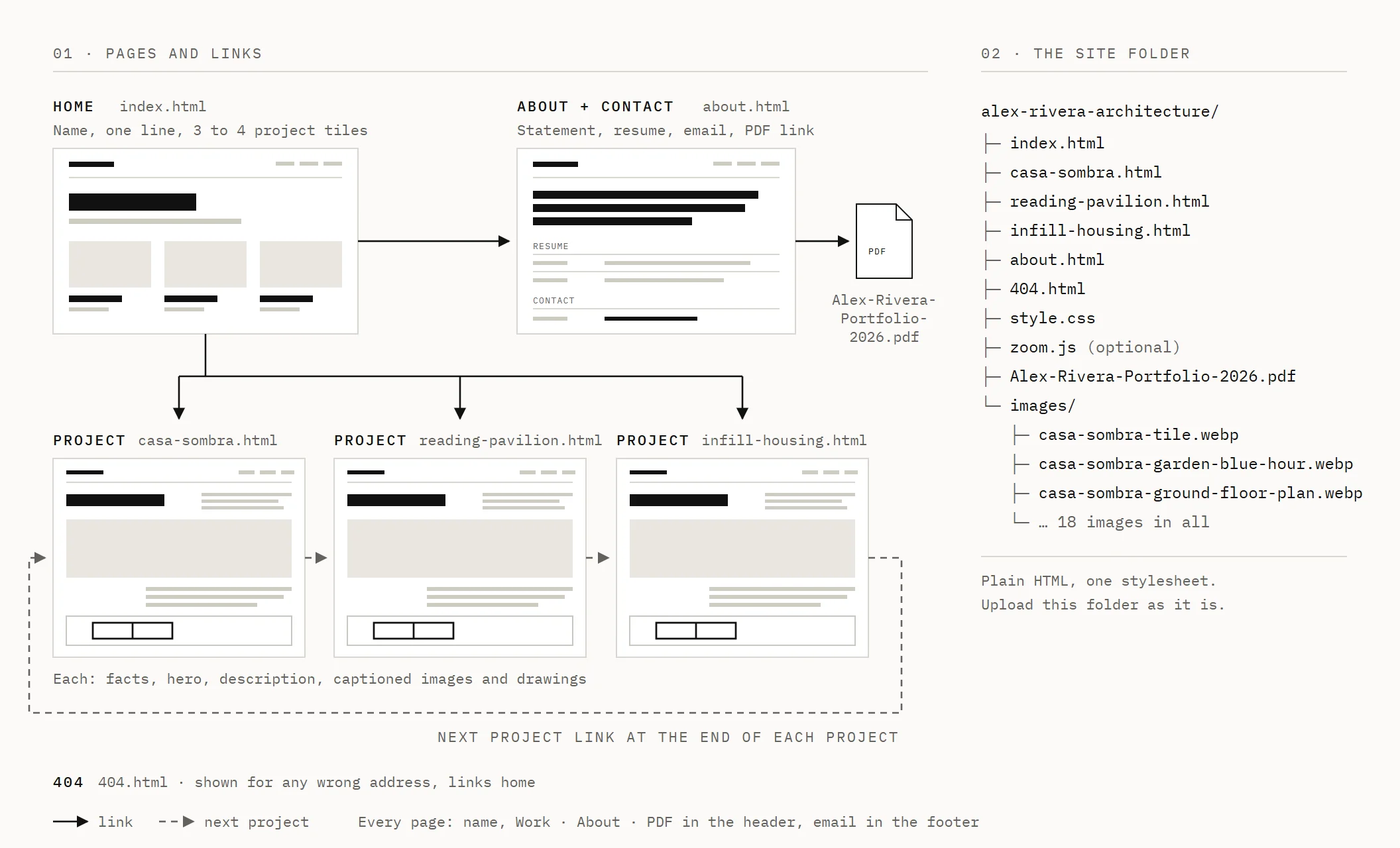
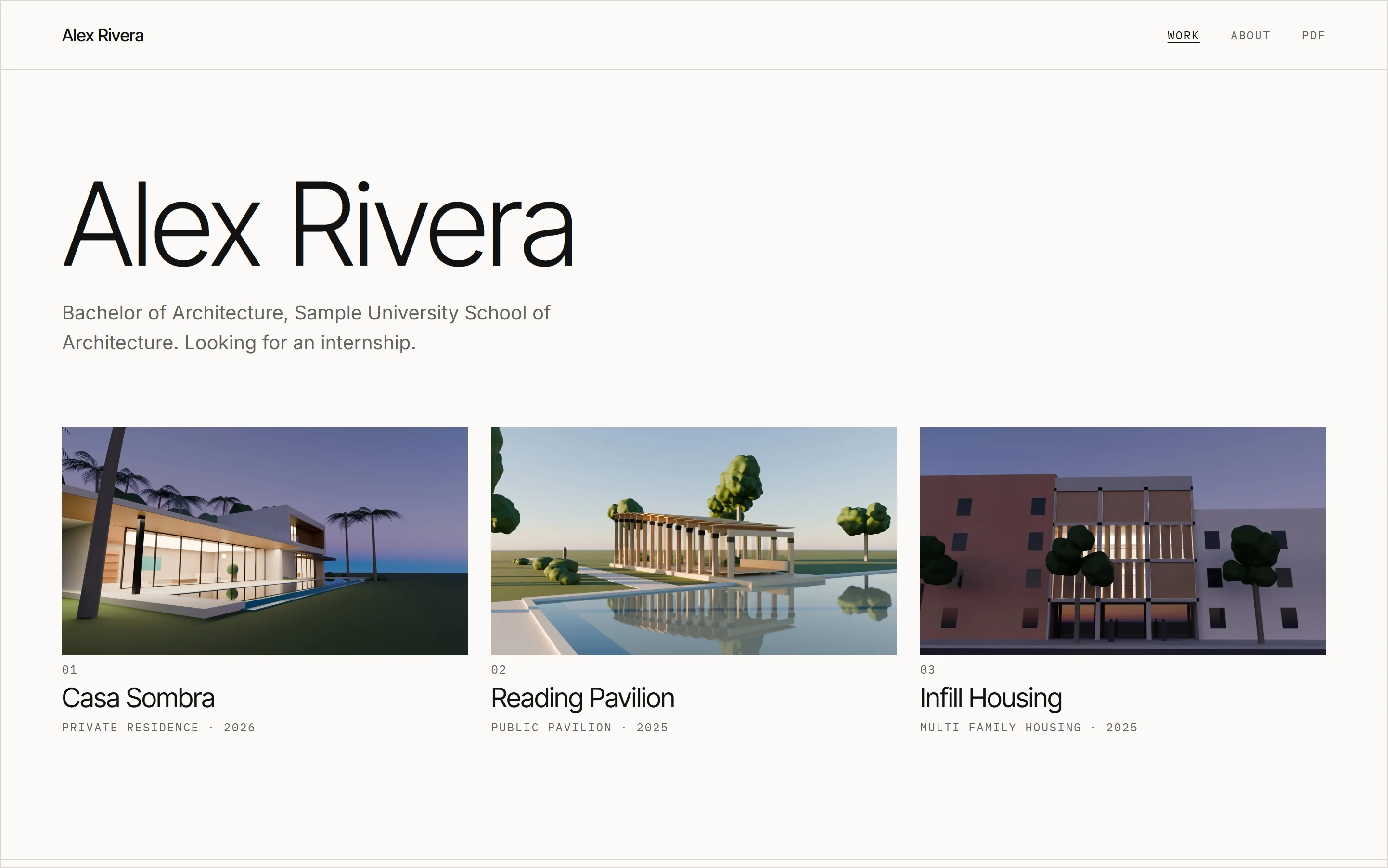
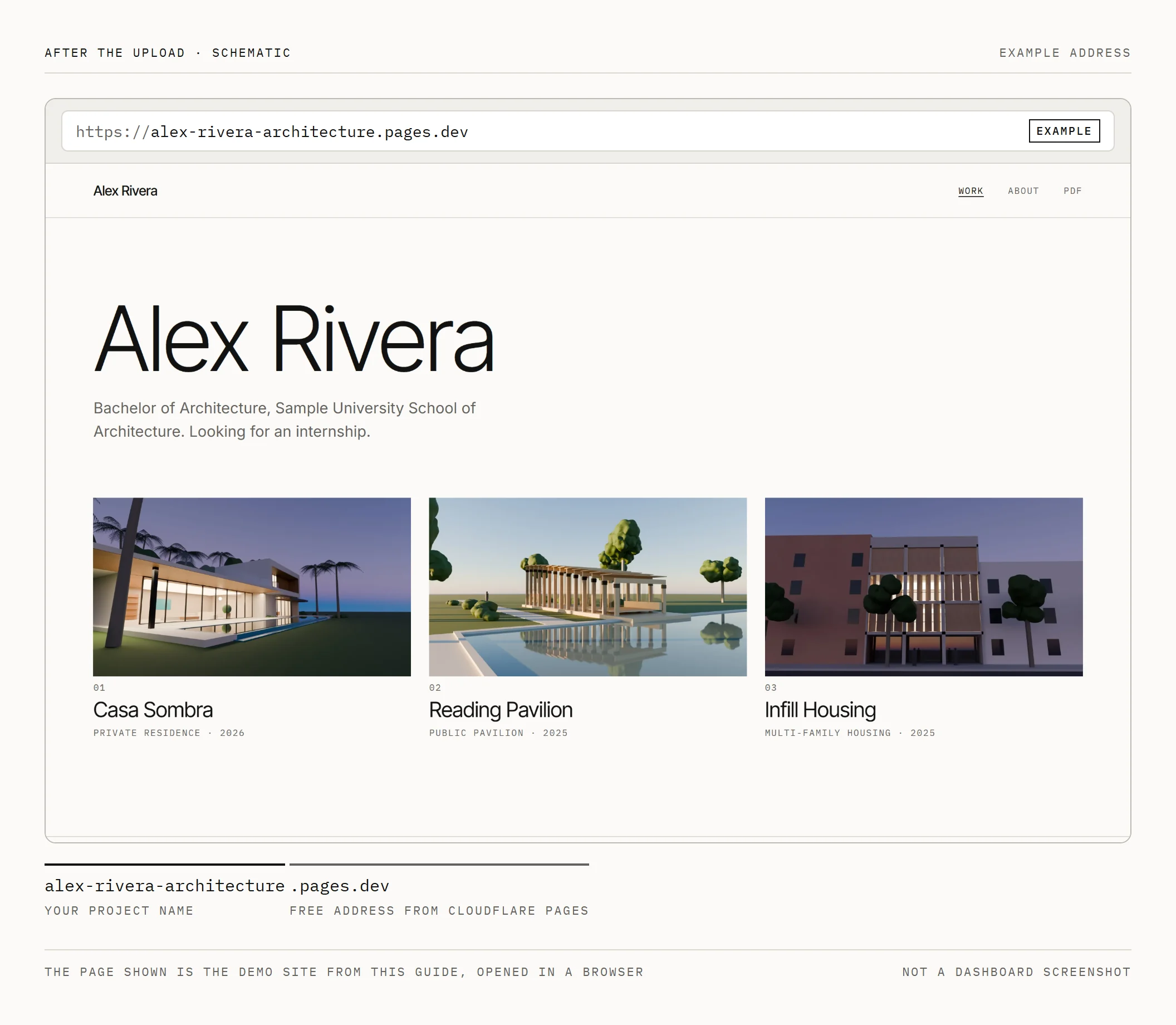
Start the home page with your name and one line: degree, school and what you're looking for. Follow with 3 to 4 project tiles, each showing one image, title, type and year. The home page needs nothing else, and it puts every project one click away.
On project pages, use this order: title and facts, full-width hero, description, then images explaining the idea, plan and section, and details. Put captions underneath. End with a next project link so reviewers can keep reading without returning home.
When comparing architecture portfolio website examples, look for readable drawings and short text. The best architecture portfolio websites let work load quickly and fill the screen, with navigation reduced to labels such as Work, About, Contact or PDF.
Drawings and images on screen
Run heroes and important drawings across the content column, around 1200 to 1400 px wide on a laptop. Small thumbnails hide the decisions in a drawing.
Link plans and sections to the full-size image alone; on phones, that lets readers pinch to zoom. Keep line weights strong enough to read at screen width. Thin lines that survive 300 ppi printing can disappear on screen. Small text does the same: room labels sized for a printed sheet can shrink to a few pixels at screen width, so enlarge them before export or rely on the zoom link.
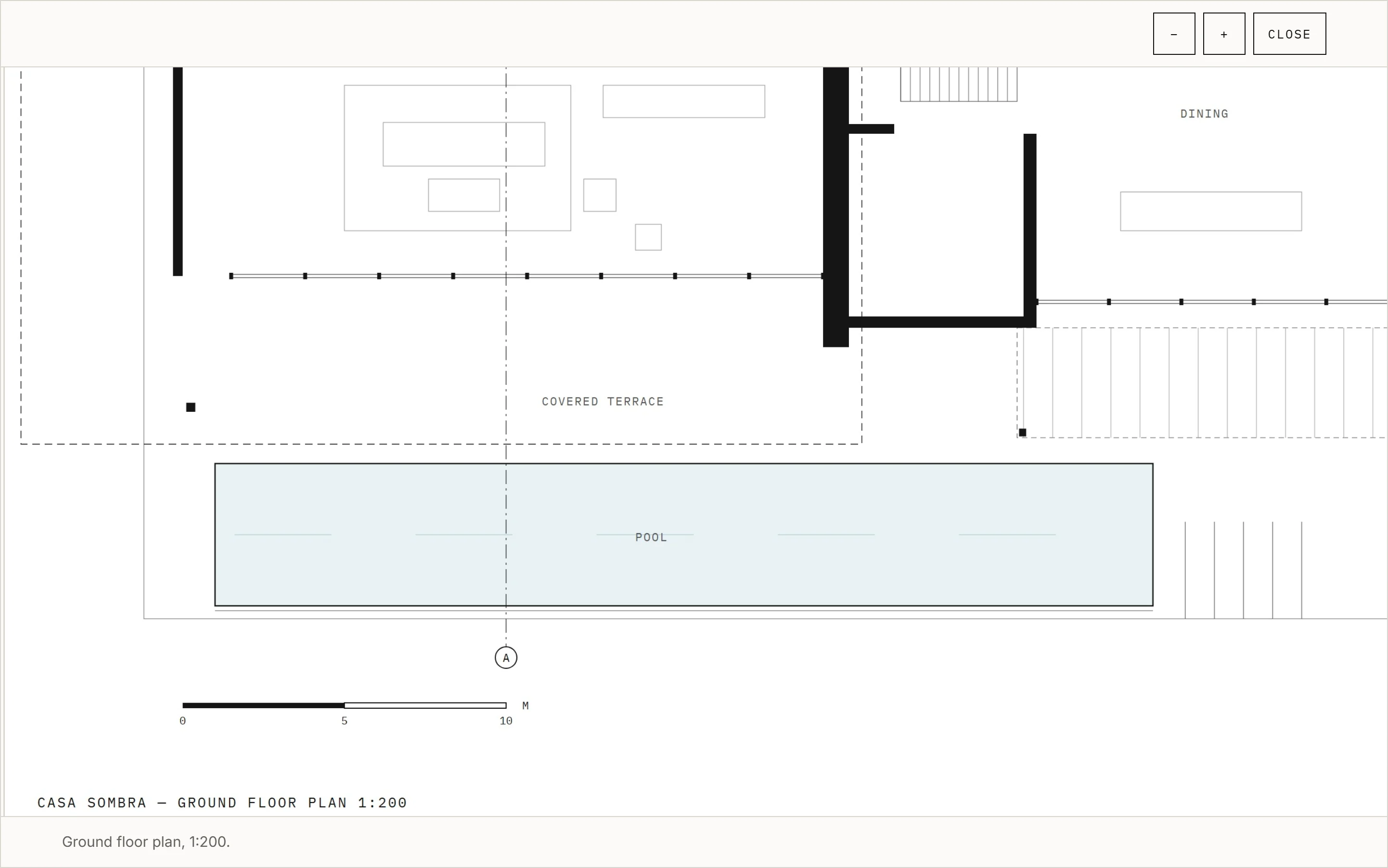
Give each caption one idea, up to 15 words, including the drawing name. A ratio such as 1:200 is true only at a known print size. Put a graphic scale bar and north arrow inside the drawing before export. The caption can name the plan and its original drawing scale.
Use one column on phones, full-width images and body text at least 16 px. Aim for roughly 60 to 75 characters per line on desktop. Test at about 390 px wide in your browser's device toolbar and on your phone; reviewers may open the link there first.
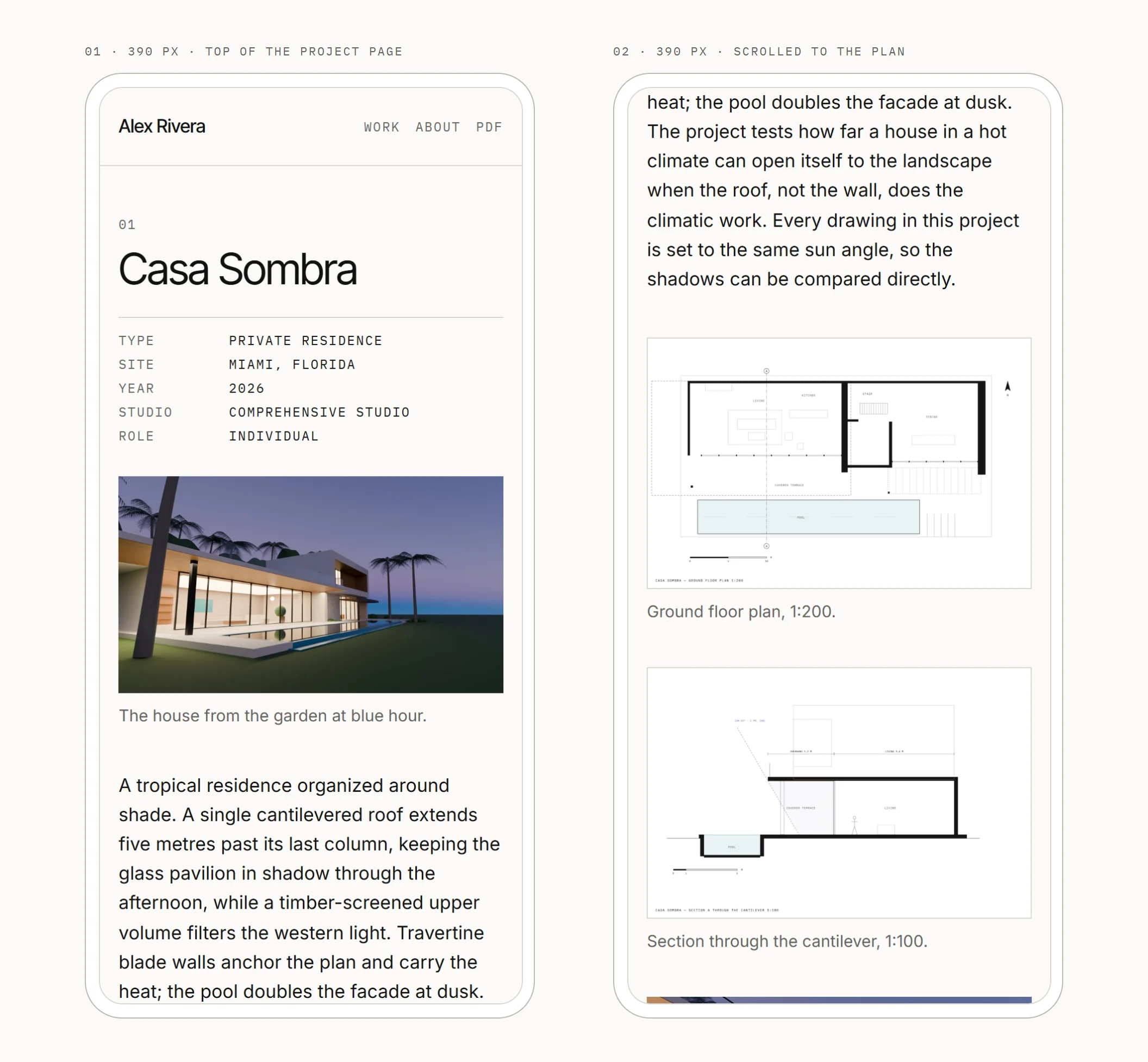
Give every image alt text describing what it shows: Ground floor plan of a courtyard house.
Image sizes and load speed
Use these export targets:
- Heroes and full-width images: 2400 px long edge, or the image's own size if it is smaller. Export as WebP or JPEG at quality 75 to 82 and keep each file under about 450 KB. Never enlarge an image to reach a target.
- Other project images: 1600 to 2000 px wide, under 300 KB.
- Home tiles: 1200 px wide, under 150 KB.
- Line drawings: PNG or lossless WebP on white, 2400 to 3200 px long edge, aiming below 600 KB. Link a sheet PDF if more detail is needed.
Aim below about 2 MB for the home page's first load and 5 MB for a project page. Set images below the first screen to loading="lazy". Give every image width and height in HTML so the page doesn't jump during loading.
Use lowercase filenames with hyphens: courtyard-house-ground-floor-plan.webp instead of IMG_4032.jpg. Resize and convert with a free browser tool such as Squoosh. Keep the linked PDF under 10 MB, comfortably below Cloudflare's 25 MiB per-file cap.
Build it with plain HTML files
Use a plain text editor and a browser. VS Code is free; Notepad or TextEdit in plain-text mode also work. You need no framework, build step or other installation. HTML holds content; CSS controls appearance.
Keep these together in one folder:
- index.html: home.
- about.html: statement, resume and contact.
- courtyard-house.html: one HTML file per project.
- style.css: all styling.
- images/: image files.
- Firstname-Lastname-Portfolio-2026.pdf: application PDF.
- 404.html: page not found, with a link home.
A top-level 404.html matters: without it, Cloudflare Pages assumes a single-page app and serves home for wrong addresses. Cloudflare also redirects about.html to /about automatically, giving you clean published addresses. Keep local links ending in .html while working. The 404 page is the exception: it can appear at any wrong address, so link its stylesheet as /style.css and its home link as /. Those two links only work once the site is online. See Cloudflare's serving rules.
Write one project page completely, double-click it to open in your browser, and check phone width. Copy it for the others, replacing text and images. That folder of HTML files and one stylesheet is your architecture portfolio website template. A sample site built this way is online if you want to see the result or view its source. Prompt 1 below gives the starter-file instructions if you want help assembling it.
Match your PDF's fonts using the layout guide's type directions: Inter for a neutral grotesk, Instrument Serif with Instrument Sans for an editorial direction, or Archivo expanded in caps. Use IBM Plex Mono for labels. All are free from Google Fonts.
Optional: use an AI agent to restyle and add interactions
An AI portfolio website uses the same plain files as one built by hand. The site works without AI, and ChatGPT, Claude, Gemini or another coding agent can help if you want to restyle it or add interactions.
In regular chat, paste one file, request a change and paste the result back. Free plans work for small files. Tools that open and edit your folder directly usually need a paid plan. Before any agent edits, copy the whole folder as a backup, or use Git through the route below.
AI may draw, style and render geometry you modeled; it never adds to or changes your design.
Here, the agent changes the site's appearance and behavior; your projects, drawings, images and text stay as supplied. It must not generate building images, alter renders or write claims you didn't make. Check your school's or employer's AI policy.
Prompt 1: build the starter files
Create a plain static architecture portfolio with index.html, about.html, one HTML page per project, style.css and 404.html. Use HTML and CSS only, with no frameworks, build step or tracking scripts. My supplied content follows: [NAME, STATEMENT, RESUME, EMAIL, PDF FILENAME, PROJECT FACTS, 80 TO 120 WORD DESCRIPTIONS, CAPTIONS, IMAGE FILENAMES, DIMENSIONS AND ALT TEXT]. Use only that material. Leave visible placeholders for missing information. Include navigation, project facts, a hero, captioned drawings and next-project links. Give images width, height and alt attributes; lazy-load images below the first screen. Do not change, add or invent text, images or design content.
Prompt 2: restyle the site
Edit style.css only. Apply [TYPE DIRECTION FROM THE THREE OPTIONS ABOVE] and [COLOURS]. Use the same fonts as my PDF. Keep the HTML content untouched. Make body text at least 16 px, with one column and full-width images on phones. Keep desktop text lines roughly 60 to 75 characters long. Preserve readable captions, drawing space and visible keyboard focus. Return the complete stylesheet so I can replace the file. Do not change, add or invent text, images or design content.
Prompt 3: add drawing zoom
Add full-screen viewing for images marked as drawings in [PROJECT FILES]. Use plain JavaScript in one small file, with no external libraries. Support click to open, zoom and pan, and closing with Esc or a visible tap control. Make it work on phones and with the keyboard. Return focus to the opening link when closed. Keep direct image links usable without JavaScript. Use my existing drawing files and alt text. Do not change, add or invent text, images or design content.
Prompt 4: add a home page interaction
On the project tiles in index.html, show each project's supplied type and year on hover and keyboard focus. On desktop hover only, show a second supplied image from [SECOND IMAGE FILENAMES FOR EACH PROJECT]. Keep titles visible throughout. Keep type and year visible on touch screens. Avoid loading second images during the initial page load. There are 3 to 4 projects, so add no filters or search. Respect reduced-motion preferences. Do not change, add or invent text, images or design content.
Prompt 5: review before publishing
Read every file in [SITE FOLDER], or the files I paste, and list problems only. Check images against [IMAGE SIZE TARGETS ABOVE], missing alt text or width and height, broken links, and layout breaks at 390 px. Flag descriptions outside 80 to 120 words, captions over 15 words, and claims absent from [MY ORIGINAL TEXT]. If you cannot inspect image bytes or render a page, identify those checks as unverified. Output a fix list and change nothing. Do not change, add or invent text, images or design content.
Host it free on Cloudflare Pages
Your free account gives you project-name.pages.dev. Choose carefully: alex-rivera-architecture becomes the address; Cloudflare adds random characters if the name is taken. These are the documented upload steps as of November 2026; dashboard labels can change.
- Sign up for a free Cloudflare account and log in.
- Open Workers & Pages.
- Select Create application, then Get started, then Drag and drop your files.
- Enter your project name.
- Drop in your site folder or its zip, with index.html at the top level.
- Select Deploy site.
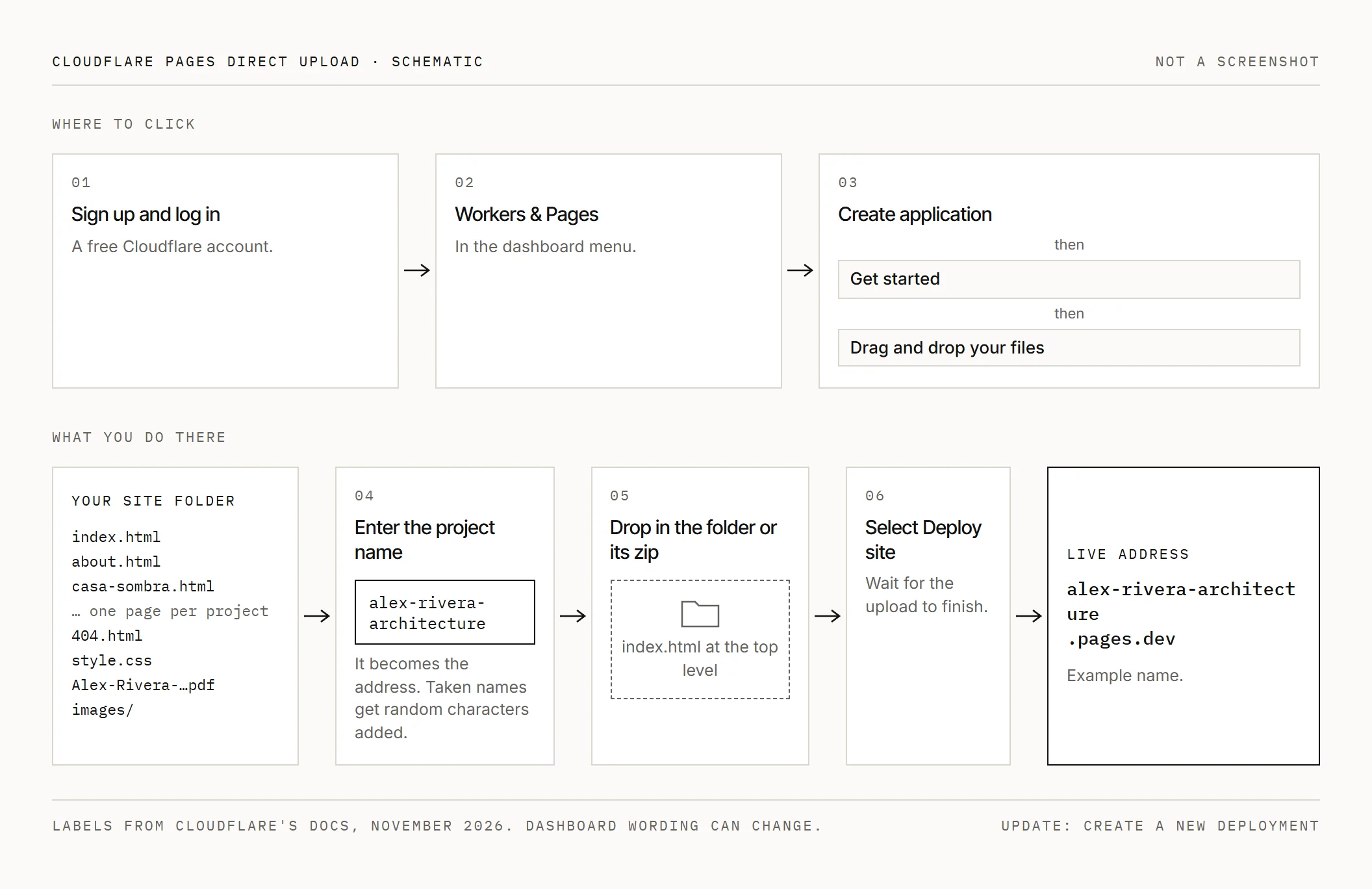
The address appears when deployment finishes.
To update, open the project, select Create a new deployment, choose production and upload the whole folder again.
Drag-and-drop accepts 1,000 files, up to 25 MiB each. The Free plan limits allow 20,000 files per site through command-line upload, 100 projects per account and 100 custom domains per project. Your 3 to 4 projects should need about 30 to 80 files. Static-file requests are free.
For automatic updates, put the folder in GitHub or GitLab; GitHub Desktop is free and avoids the command line. Follow Workers & Pages > Create application > Pages > Connect to Git. Pick the repository, leave the build command blank and set the output directory to the folder holding index.html. Every push publishes; the Free plan includes 500 builds monthly.
Pick your route first. Direct-upload projects cannot switch to Git, or Git projects to direct upload. Switching requires a new project, with a new pages.dev name if the old one remains occupied.
Cloudflare's Pages banner says "Start new projects with Workers." Workers also hosts static sites free at workers.dev, through documented Git or command-line setup. Pages direct upload remains the documented folder-upload route without commands. Workers suits you too if you're comfortable with Git and the command line.
Add your own domain (optional)
Yourname.pages.dev works on a resume. If you want a .com, budget about $11 a year at an at-cost registrar. Cloudflare sells at cost, with renewals costing the same as registration. Prices change, so check before you buy.
To buy through Cloudflare, open Register domains, search, select Purchase, choose the term, enter contact and payment details, then Complete purchase. Auto-renew starts on. Personal details in public WHOIS are redacted where the registry allows; Cloudflare-registered domains must use its nameservers.
Open your Pages project > Custom domains > Set up a domain, enter the domain and continue.
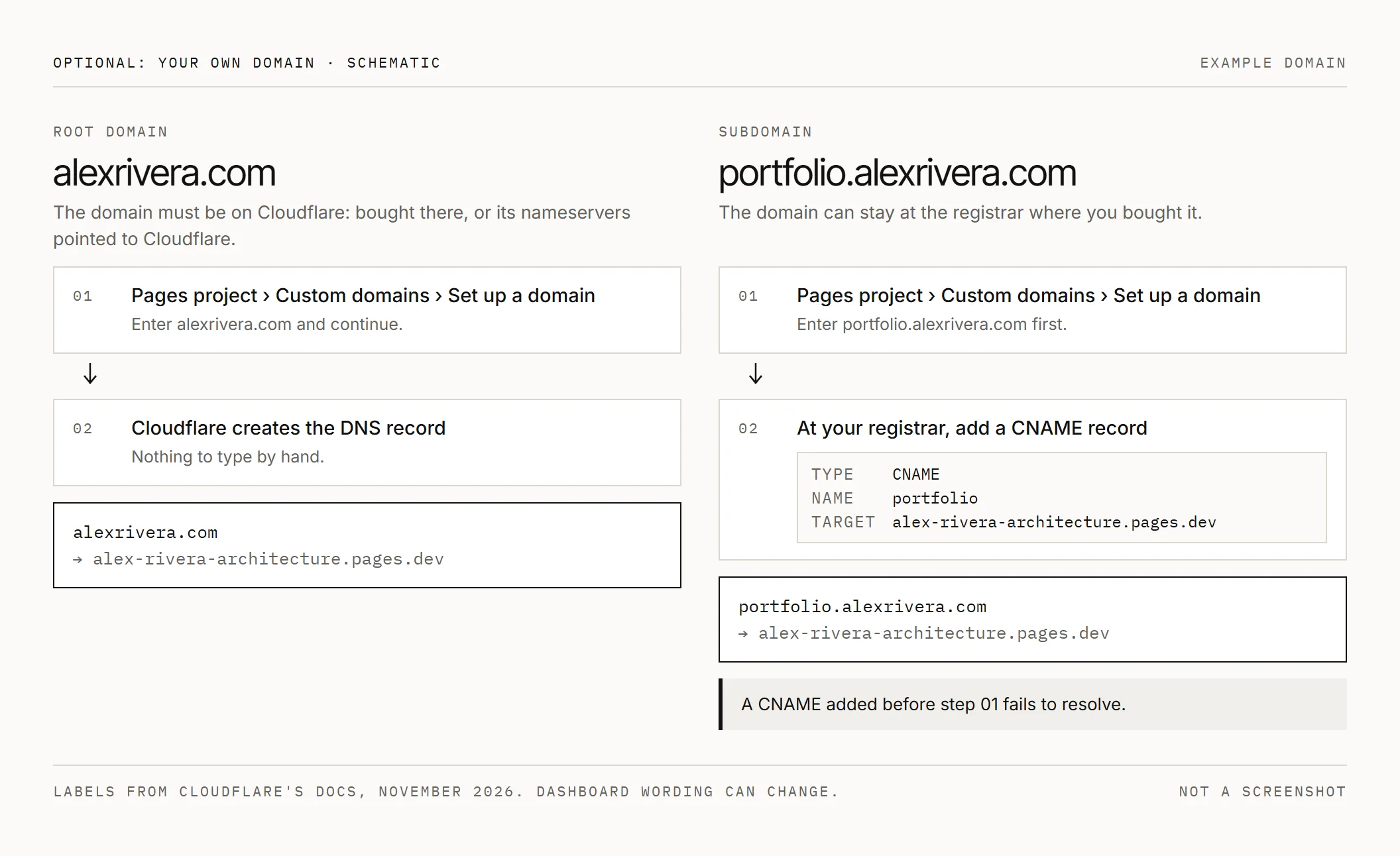
For alexrivera.com, the domain must be on Cloudflare. That's automatic when bought there; otherwise point its nameservers to Cloudflare. Cloudflare creates the DNS record.
For portfolio.alexrivera.com, keep the domain elsewhere and add a CNAME pointing to your pages.dev address. Add the domain in Pages first: a hand-added CNAME before association fails to resolve. Follow the custom-domain instructions.
Try firstnamelastname.com, adding architecture or design if taken. Avoid hyphens and school-year words that date.
Website builders compared
The best website builder for architects depends on your budget and time for setup.
A Squarespace architecture portfolio suits a quick start with polished templates. There's no free plan: a 14-day trial leads to Basic from $19 monthly, billed annually. The cost continues while the site stays up; a student discount program exists. See Squarespace pricing.
Wix has a free plan. Paid plans start at $17.77 monthly on yearly billing, with prices varying by location. Paid plans connect your domain and remove Wix branding.
Cargo is popular with art and design students. Its student program offers free use through a request emailed by your professor or school administrator.
Adobe Portfolio comes with many Creative Cloud plans, including some school-provided access. Check whether yours includes it before choosing this route.
Behance and Issuu suit discovery and page-flip PDFs inside someone else's site. Your work sits beside other people's, and you don't control the layout.
Plain HTML on Cloudflare suits time spent learning and assembling files. Hosting is free and there's no subscription to cancel. You own the files, so you can move them to another host later.
Privacy and permissions
Publish an email, ideally a separate applications address. Leave out your home address and phone number.
For private houses, real or used as studio sites, show city and region only. Omit street addresses and exact locations. Get the owner's permission before publishing plans of someone's real home.
Firm work belongs to the firm. Get permission for public posting, credit the office and omit client names and confidential drawings. Permission for a PDF sent privately may not cover a public site. Name teammates and state your contribution.
Phone photos can contain GPS and camera metadata. Remove it on export using Photoshop Export As with metadata set to none, or a converter that removes it. Check one file's properties before uploading.
Everything you upload is public. Each upload also gets its own address, a short code in front of your project's pages.dev name, and that address can remain reachable after you publish a newer version.
Check the folder before every upload. If private material slips through, upload a corrected version and remove the old deployment, or delete and recreate the project. Check the current dashboard option for removing a deployment.
Pre-publish checklist
- Keep only 3 to 4 projects.
- Check every image against its size target.
- Give every image alt text, width and height.
- Add drawing scale bars and north arrows where relevant.
- Keep captions under 15 words.
- Keep descriptions within 80 to 120 words.
- Link the PDF, kept under 10 MB.
- Test at about 390 px wide and on a real phone.
- Click every link, including next-project links and the PDF.
- Include 404.html.
- Remove home addresses, phone numbers and photo metadata.
- Confirm firm permissions, teammate permissions and credits.
- Keep your name and email on every page or one click away.
- Add the address to your email signature and LinkedIn.
If your PDF needs work, the architecture portfolio layout guide covers the pages. You can get the free portfolio checklist while you put both together.
FAQ
Do I need a portfolio website if I have a PDF portfolio?
Keep sending the PDF with applications. An architect portfolio website gives reviewers a current link and room to inspect drawings without downloading your portfolio.
How many projects should an architecture portfolio website have?
Use 3 to 4 strong projects. Give each enough space to explain your decisions and your role.
Is Cloudflare Pages really free?
Yes, for this static site on the Free plan. Drag-and-drop allows 1,000 files and 25 MiB per file; check the current limits before uploading.
Do I need my own domain name?
No, pages.dev works on your resume. A .com is optional, at about $11 yearly through an at-cost registrar; check before buying.
Can I use AI to build my portfolio website?
Yes, for site building and styling. Keep your architectural work intact and check every change against your supplied drawings, images and text.
Is Squarespace or a free site better for an architecture portfolio?
Squarespace is quicker to set up, from $19 monthly billed annually. Plain HTML takes your time to build; hosting is free and you own the files.
Can I show internship work on my website?
Only with the firm's permission for public posting. Credit the office and describe your own role.
Get the free portfolio checklist
A two-page checklist of everything in this guide. It downloads as soon as you sign up. No spam.