Skiaform / Guides
SKP to OBJ for Blender with Skiaform OBJ Export
Convert SKP to OBJ for Blender with a free SketchUp extension that exports one object per tag and keeps materials, textures, and model scale in metres.
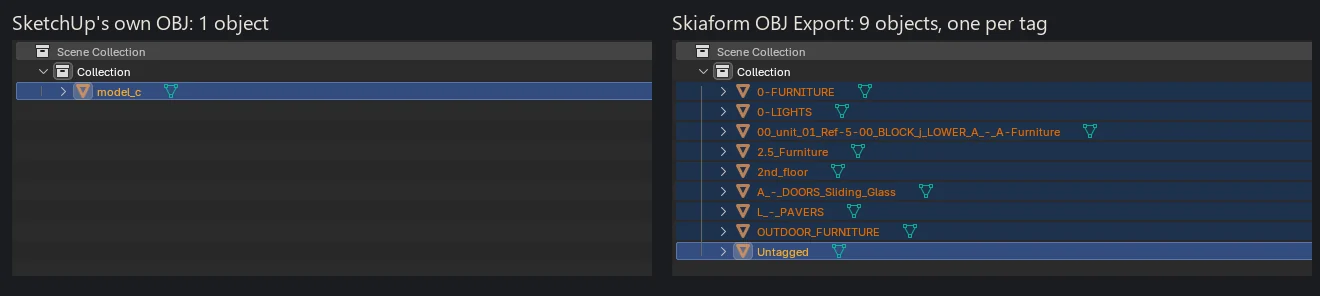
SketchUp Pro can export OBJ directly, but in our test Blender's default OBJ import brought the whole model in as one object, with none of its SketchUp tag names. The free Skiaform OBJ Export extension writes one object per tag by default and keeps materials, textures and real-world scale in metres.
Skiaform OBJ Export 1.0.0 · free SketchUp extension (.rbz, 17 KB)
Tested with SketchUp 2027 for Windows and Blender 5.1. Needs SketchUp desktop. No account or email needed.
What goes wrong with SketchUp's own OBJ and FBX
SketchUp Pro's native OBJ export writes an .obj file and a companion .mtl for materials. In our test, SketchUp 2027 exported a 13 MB house model as 471 internal mesh and nested groups. The file had no OBJ object entries and no SketchUp tag names. With Blender 5.1's default OBJ import settings, the house came in as one object named after the file, with 40 materials.
Blender can split an OBJ by object or by group. Splitting the native export by group uses the internal names that SketchUp wrote into the file, such as Mesh99 Group27 Group26 Model. If you use tags to organise walls and roofs in SketchUp, those names are missing from the native OBJ.
FBX has a different issue. The FBX file we exported from SketchUp 2027 was ASCII. Blender's FBX importer reads binary FBX only, so it could not open that export. For SketchUp to Blender, use OBJ.
Install Skiaform OBJ Export
- Download the Skiaform OBJ Export
.rbzfile. - In SketchUp desktop, open Extension Manager and choose Install Extension.
- Select the downloaded
.rbzfile to install it. The exporter is available under File > Skiaform OBJ Export > Export OBJ for Blender.
Export your SketchUp model
In SketchUp, choose File > Skiaform OBJ Export > Export OBJ for Blender. Choose how to divide the model into Blender objects, which axis to use, whether to export textures, and how much of the model to include. The exporter leaves your SketchUp model unchanged. In our tests the tagged house (124,874 triangles, 45 materials, 25 textures) exported in 6.1 seconds, and a larger scene with 171,460 triangles took 9.7 seconds.
One object per tag. This is the default. Use it when tags already describe the parts you want to see in the Blender Outliner. Our tagged test house came in as nine objects, one per tag, such as 2nd_floor, L_-_PAVERS and OUTDOOR_FURNITURE. Spaces and symbols in tag names become underscores. If your model has no tags, you get a single Untagged object.
One object per top-level group or component. Use this when your model is organised through groups and components. Each top-level group or component becomes its own object in Blender. This also gives you separate objects when the SketchUp model has no tags.
One object per material. Choose this when you want the Blender objects organised by material. Our test import produced one object for each material.
Y up or Z up. Choose Y up for Blender's default OBJ import settings. Our test model came in upright with this option, and a 1 m test cube measured 1 m in Blender. The exporter also offers Z up.
Export or skip textures. Choose to export textures if you want the image files that go with your materials. The .mtl file refers to the exported textures in the <name>_textures folder.
Selection only or whole model. Choose Selection only to export the parts you selected in SketchUp, or choose the whole model. The exporter skips hidden objects and anything on hidden tags or in hidden tag folders.
Import the OBJ into Blender
Keep the .obj, its companion .mtl, and the <name>_textures folder together. If you move the export, move them together. Blender reads the material definitions from the .mtl and uses the texture paths in that file to find the images.
In Blender, choose File > Import > Wavefront (.obj) and select the .obj. Leave the import settings at their defaults if you exported with Y up. Check the Outliner for the object names. The figure shows the same house both ways: SketchUp's own OBJ as one object, and our export as one object per tag, with Untagged holding geometry that has no tag.
What the extension does not export
The OBJ contains triangulated faces with shared vertices, UVs, and normals that preserve smoothing. The export leaves out edges and lines, dimensions, text, section planes, images, cameras and scenes, and lights. Material textures are exported through the texture option.
We did not test textures positioned with SketchUp's projected mapping or distorted pins. Those textures may map differently in Blender.
FAQ
Is Skiaform OBJ Export free?
Yes. Skiaform OBJ Export is a free SketchUp extension. The download is an .rbz file you install through SketchUp's Extension Manager.
Does it work with SketchUp Free or Go?
No. Skiaform OBJ Export needs SketchUp desktop because it runs as an extension inside SketchUp.
Can I convert SKP to OBJ without SketchUp?
Online SKP-to-OBJ converters exist. We have not tested them. Skiaform OBJ Export opens from the File menu in SketchUp desktop and exports the model from there.
Should I convert SKP to FBX for Blender?
Use OBJ for this workflow. The FBX export we tested from SketchUp 2027 was ASCII, which Blender's FBX importer cannot open. The OBJ from Skiaform OBJ Export opened in Blender 5.1 with the default import settings.
Does the export keep textures?
Yes, when you choose to export textures and keep the texture folder with the .obj and .mtl. In our test, Blender loaded the exported PNG and preserved its scale both on painted faces and on faces that inherited the material from a group. A brick texture sized at 1 m by 0.5 m repeated twice per metre vertically. The test also preserved glass transparency.
Does it work on Mac?
We have not tested the extension on macOS. Our tests used SketchUp 2027 for Windows and Blender 5.1. We have not tested older SketchUp versions.
For AI renders of the same model, use Skiaform Render for SketchUp or the version for Blender.
Get new free tools
We make free tools for architects who model in SketchUp, Blender and Rhino. Leave your email and we will tell you when there is a new one. The download above does not need an email.